


Introducing FlyTradr AI, Guided Strategy Building With You In Control
Turning a trading idea into a precise set of rules can be harder than having the idea in the first place.
You may know that you want to enter when momentum improves, avoid weak market conditions, and control risk with a defined exit. But translating that intent into exact indicators, conditions, settings, and testable rules takes time. Even after the strategy is built, interpreting a backtest or deciding what to test next can create another round of questions.
That is where FlyTradr AI is designed to help.
FlyTradr AI is a guided assistant inside supported FlyTradr workflows. It can help turn supported strategy ideas into reviewable drafts, explain the testing context available in the active workspace, and help you plan a focused next experiment. It works alongside FlyTradr's existing validators, permissions, and approval steps rather than replacing them.
The important part is that you remain in control. FlyTradr AI does not provide trading signals, promise profitable outcomes, or make account decisions on your behalf. It helps you move from an unclear question to a clearer, reviewable next step.
In this guide, we will explain what FlyTradr AI is, where it fits in the strategy workflow, what it can and cannot do, how plan-based access works, and how to use it effectively.
Why We Built AI Assistance Into The Trading Workflow
Most traders do not begin with a perfectly written strategy specification.
They begin with an observation.
Perhaps a moving average crossover seems to identify a trend. Maybe a Supertrend change appears useful when it agrees with another indicator. Or perhaps a backtest looks promising, but one side of the strategy behaves differently from the other.
The gap between that observation and a testable strategy is where much of the real work happens. Entry rules must be explicit. Exit rules need to be defined. Position sizing and risk controls need to be reviewed. The strategy must then be tested under assumptions that can be understood and repeated.
Traditional AI chat tools can discuss these subjects in general terms, but they do not automatically understand the structure, validation rules, permissions, or current workspace inside a trading platform. A general answer may sound useful while still failing to map cleanly into the product.
FlyTradr AI takes a different approach. It works inside supported FlyTradr workflows and uses approved context for the active task. That allows the assistant to focus on the strategy, settings, or testing information you are already working with.
The goal is not to make the AI the trader. The goal is to reduce the friction between an idea, a structured draft, a review, and a sensible next experiment.
What Is FlyTradr AI?
FlyTradr AI is an AI-assisted strategy building and testing companion built into FlyTradr.
It is designed around three principles.
It Is Contextual
The assistant works inside supported FlyTradr workspaces. When a capability is available, it receives only the approved product knowledge and workspace information needed for that task.
This makes the conversation more useful than a disconnected question-and-answer exchange. For example, an explanation can refer to the strategy details or testing context available in the active workspace instead of asking you to recreate everything in a separate tool.
It Is Reviewable
When FlyTradr AI helps structure a strategy idea or proposes a supported setting change, the result remains a draft or proposal for you to review.
Nothing should be treated as accepted merely because the assistant suggested it. FlyTradr's schemas and validators still determine whether supported details are structurally valid, and you decide whether to load, edit, test, or leave a proposal unchanged.
It Is Bounded
FlyTradr AI has a deliberately defined scope. It can help with clarity, structure, explanations, and reviewable next steps. It cannot bypass account permissions or independently start operational actions.
These boundaries matter in a trading product. A helpful assistant should make a workflow easier to understand without quietly turning a conversation into an unreviewed account action.
What FlyTradr AI Can Help You Do
FlyTradr AI supports several parts of the journey from strategy idea to structured review.
Turn A Supported Idea Into A Reviewable Strategy Draft
You can describe a supported strategy idea in plain language. The assistant can help identify the details required by Strategy Builder and organise those details into a structured draft.
Suppose you start with this idea:
Enter long when a faster moving average crosses above a slower moving average, enter short on the reverse cross, and use a fixed stop loss.
That idea still leaves important questions. Which moving-average periods should be used? What price source should they follow? What closes each position? What percentage should the stop loss use? Is position sizing defined?
FlyTradr AI can guide the conversation toward those missing details and prepare a reviewable draft when the supported rules are clear enough. You can then inspect the proposal before using it in Strategy Builder.
This is assistance with translation and structure. It is not a claim that the proposed strategy will perform well.
Explain The Testing Context In Front Of You
Backtest results can contain many metrics: return, drawdown, win rate, trade count, average trade, fees, slippage, and more. Each metric describes a different part of the historical result.
In supported testing workspaces, FlyTradr AI can help explain the results, settings, and artifacts available in that workspace. This can be useful when you want to understand what a metric means, why two test configurations differ, or which assumption deserves closer inspection.
The explanation stays educational. Historical results do not predict future performance, and an AI explanation does not turn a backtest into a recommendation.
Plan A Focused Next Experiment
When a strategy produces an unexpected result, changing several settings at once can make the next test harder to interpret.
FlyTradr AI can help you identify a more focused experiment using the information already available in the supported workspace. That might mean reviewing one filter, comparing one nearby parameter, checking long and short behaviour separately, or testing a more conservative assumption.
The assistant can help structure the question. You still decide whether the experiment is appropriate and whether to run it.
Find Grounded Product Guidance
Sometimes the question is not about the strategy itself. It is about the workflow.
You may want to know where to review a setting, what a validation message means, or which FlyTradr workspace supports the next stage of testing. FlyTradr AI can provide approved product and workflow guidance when that capability is supported.
This makes the assistant useful as a guide inside the platform without turning it into an unrestricted chatbot with unnecessary account access.
How The FlyTradr AI Workflow Works
The workflow is intentionally simple.
Step 1, Ask In Context
Open FlyTradr AI from a supported workspace and describe the question, idea, or result you want help understanding.
You do not need to write a perfect prompt. Clear details help, but the assistant can ask for clarification when a required strategy field or decision is missing.
Step 2, Review The Response
The assistant returns a response based on the approved context available for the task. Depending on the capability, that response may be an explanation, a structured strategy draft, or a proposed setting change.
Read the response as a proposal to examine, not as an instruction that must be followed.
Step 3, Validate The Details
FlyTradr's product rules, schemas, and permissions remain the source of truth. If a strategy detail is unsupported, incomplete, or inconsistent, it should not silently pass into the workflow.
This separation is important. The assistant helps with language and structure, while deterministic product controls handle validation.
Step 4, Choose The Next Step
You decide what happens next.
You may edit a draft, approve it for loading into the supported tool, run a separate test using the platform controls, ask another question, or leave the proposal unchanged. FlyTradr AI does not turn a chat message into an automatic backtest, paper-trading session, deployment, or broker order.
A Practical Example, From A Strategy Question To A Reviewable Change
Imagine that you have tested a trend-following strategy with long and short rules. The long side generates trades, but the short side rarely activates.
A useful conversation could begin like this:
This strategy is intended to trade in both directions, but the backtest is producing mostly long trades. What should I review?
In a supported workspace, FlyTradr AI can use the available context to explain which conditions may be restricting the short side. For example, the short entry may require both a bearish signal and an additional filter that rarely becomes true at the same time.
You could then ask:
Prepare a reviewable version that removes the additional filter from the short entry while leaving the long rules unchanged.
The assistant can propose the supported change and show what will remain unchanged. You review that draft before deciding whether to load it into Strategy Builder.
The final test still belongs to you. Removing a condition may increase the number of short trades, but it does not guarantee that those trades will improve the strategy. The value of the AI assistance is that the proposed change is clearer, narrower, and easier to review.
Why Reviewable AI Matters In Algorithmic Trading
AI can make an interface feel faster, but speed is not the only design goal that matters.
In algorithmic trading, small wording differences can change the meaning of a rule. "Crosses above" is different from "is above." A fixed stop loss is different from an Average True Range, or ATR, based stop. Position sizing based on a percentage of capital is different from committing the full available balance.
If an assistant changes one of those details without making the change visible, the resulting strategy may not represent the user's intent.
That is why FlyTradr AI keeps drafts and setting proposals reviewable. The assistant can help you articulate a change, but the interface should show you what is being proposed. Product validation and permissions remain in place, and an explicit user decision remains part of the workflow.
This approach may involve one extra review step. We believe that is a useful trade-off. In a trading workflow, clarity is more valuable than pretending that every decision should happen automatically.
What FlyTradr AI Does Not Do
Clear limits are part of the feature, not an afterthought.
It Does Not Provide Trading Signals Or Personalised Investment Advice
FlyTradr AI does not tell you what to buy or sell, provide personalised recommendations, or act as a market-prediction service.
It can help structure rules you describe and explain supported workspace context. That is different from deciding which trade you should take.
It Does Not Promise Better Returns
An AI-generated explanation or draft cannot guarantee that a strategy, parameter, or experiment will be profitable.
Every strategy can lose money. Backtests are based on historical data and assumptions, and future market conditions can behave differently.
It Does Not Automatically Run Trading Operations
FlyTradr AI does not automatically start backtests, paper sessions, deployments, broker orders, or live-trading actions.
The assistant may help prepare or explain a supported next step, but the relevant FlyTradr controls and confirmations remain separate.
It Cannot Bypass Permissions Or Control Funds
The assistant cannot bypass FlyTradr permissions, access withdrawals, or take custody of funds. Operational controls remain authoritative regardless of what is written in the conversation.
FlyTradr AI Access And Plan-Based Credits
FlyTradr AI is available to authenticated FlyTradr customers inside supported workspaces. Usage follows the allowance included with the account's plan.
At the time of publishing, the plan allowances are:
Basic: 10,000 lifetime AI credits
Pro: 100,000 AI credits per month
Pro+: 250,000 AI credits per month
Enterprise: 1,000,000 AI credits per month
The allowance is shared across supported AI workspaces on the account. Paid-plan allowances renew monthly, while the Basic allowance is a one-time lifetime allocation. Daily fair-use protections also apply.
AI credits are a usage allowance, not a fixed number of messages. The amount used by a request can vary with the context and the length of the response. For the latest plan details, review the FlyTradr pricing page.
This structure gives every supported plan a way to use FlyTradr AI while providing larger recurring allowances for users with deeper workflows.
How To Get More Useful Responses From FlyTradr AI
You do not need to learn complicated prompting techniques, but a few habits can make the conversation more productive.
Start With The Outcome You Want To Understand
Instead of writing "fix my strategy," explain what you observed.
For example:
My strategy is intended to trade both long and short, but the latest backtest produced only long trades. Help me understand which short-entry conditions may be preventing trades.
This gives the assistant a clearer problem to examine.
State What Must Stay Unchanged
If you want to modify only one part of a strategy, say so explicitly.
For example:
Remove the 50-period EMA filter from the short entry only. Keep the long entry, exits, risk settings, and backtest configuration unchanged.
That makes the scope of the proposed change easier to review.
Ask For One Experiment At A Time
If you change the signal, timeframe, stop loss, take profit, and position sizing together, it becomes difficult to know which change affected the result.
Ask for one focused proposal, test it separately, and compare the result with the previous version.
Review The Draft Before Using It
Check the proposed indicators, periods, entry rules, exit rules, risk settings, and direction. If a detail is missing or unclear, continue the conversation before loading the draft.
AI assistance can reduce repetitive setup work. It should not replace your responsibility to understand the strategy you are testing.
How FlyTradr AI Fits Into The Wider Platform
FlyTradr AI is one layer in a broader no-code algorithmic trading workflow.
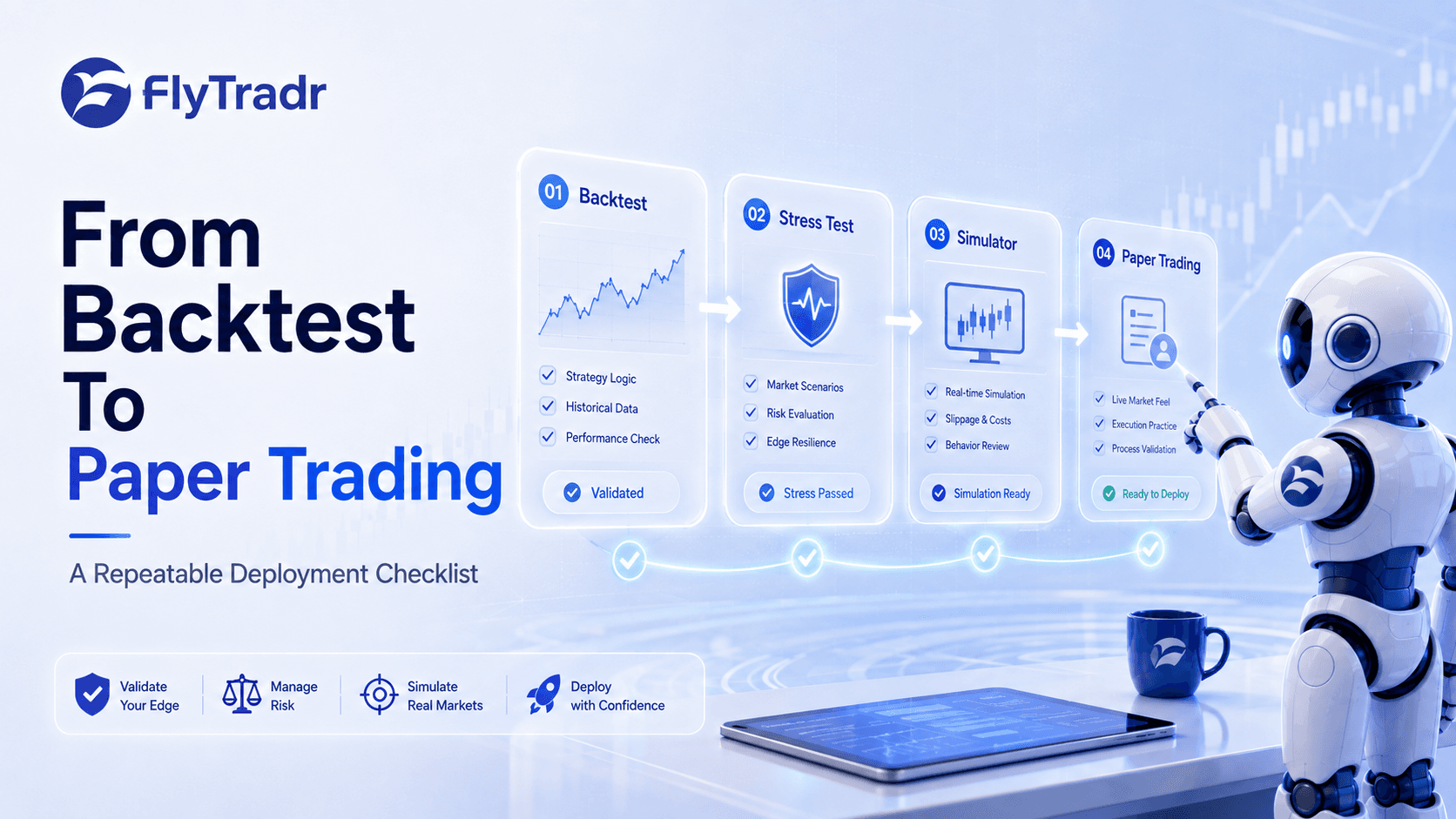
You can define and review strategy logic in Strategy Builder, examine historical behaviour in the Backtesting Lab, replay selected market conditions in the Simulator, and observe supported strategies on current data in the Paper Trader.
The AI assistant can help you understand or prepare parts of that journey where a supported capability is available. It does not collapse the entire process into one unreviewed action.
That distinction reflects how FlyTradr approaches no-code trading more broadly. Removing the need to write code should not mean removing structure, testing, or user control. The platform should make systematic trading more accessible while keeping the workflow disciplined.
Frequently Asked Questions About FlyTradr AI
Can FlyTradr AI Build A Trading Strategy For Me?
FlyTradr AI can help translate a supported strategy idea into a structured, reviewable Strategy Builder draft. You review the details before loading or using the draft, and incomplete or unsupported rules may require clarification.
Can FlyTradr AI Analyse A Backtest?
In supported testing workspaces, it can explain the results, settings, and artifacts available in that context and help plan a focused next experiment. The explanation is educational and does not predict future returns.
Can FlyTradr AI Place Trades?
No. FlyTradr AI does not place or cancel broker orders, start trading sessions, or bypass FlyTradr's permissions and confirmation steps.
Does FlyTradr AI Give Buy And Sell Signals?
No. FlyTradr AI is not a trading-signal or personalised investment-advice service. It helps users structure their own supported ideas and understand available product context.
Is FlyTradr AI Available On The Basic Plan?
Yes. Basic includes a lifetime AI credit allowance. Pro, Pro+, and Enterprise include larger monthly allowances. All supported AI workspaces on an account draw from that account's shared allowance.
Are AI Credits The Same As A Number Of Chats?
No. Request cost varies with the amount of context and the response length, so credits should not be interpreted as a guaranteed number of conversations.
The Bottom Line
FlyTradr AI is designed to make the strategy workflow clearer without taking the workflow away from you.
It can help turn supported ideas into reviewable drafts, explain the testing context available in a supported workspace, plan focused experiments, and answer grounded product questions. FlyTradr's validators, permissions, and explicit approval steps remain authoritative.
The main points to remember are:
FlyTradr AI works inside supported FlyTradr workflows rather than as an unrestricted chatbot.
Strategy drafts and setting proposals remain visible and reviewable.
The assistant can explain available testing context, but it cannot predict future performance.
It does not provide trading signals, place orders, control funds, or bypass permissions.
Access and shared AI credits follow your FlyTradr plan.
AI is most useful when it helps you ask a clearer question, review a more precise proposal, and understand the next step before you take it.
Explore FlyTradr AI, or create a free account to bring guided assistance into your strategy workflow.
Comments
Ask a question or leave feedback. Guests can post too.
Max 2000 characters.
No comments yet.
Quick answers
What is this article about?
FlyTradr AI brings guided assistance into strategy building and testing.
Who should read this article on Introducing FlyTradr AI, Guided Strategy Building With You In Control?
This article is for retail traders who want a practical understanding of introducing flytradr ai, guided strategy building with you in control before moving into backtesting, simulation, paper trading, or broker-connected execution.
What should I do after reading this article?
Use the article to clarify the concept first, then review FlyTradr workflow pages such as the algo trading platform overview, methodology and assumptions, or the FAQs page before making a platform decision.